For Planners
Switching from Dubsado: A Practical CRM Migration Guide for Wedding Pros
What transfers from Dubsado, what needs to be rebuilt, and how wedding planners and photographers can move into a free CRM without risking active client work.
Editorial Team · September 4, 2026

Switching CRMs is rarely about finding a button you like better. It is about protecting years of client history while changing the system that receives every new inquiry, contract, invoice, and payment. For wedding planners and photographers moving from Dubsado, the safest approach is a staged migration: export first, preview the mapping, confirm what will and will not transfer, and only then decide when new leads should begin in the new system.
This guide explains that process plainly. Dubsado is a capable, highly configurable business-management platform. Colara is a different operating model: a free CRM for wedding businesses connected to the wedding timeline, couple, planner, photographer, vendors, and live day-of workflow.
What the Colara Free CRM includes
Wedding planners and photographers can keep the core CRM for $0 a month with no deadline to upgrade and no cap on leads or clients. The Free plan includes the pipeline, client records, proposals, e-signature contracts, invoices, scheduling, questionnaires, notes, tasks, and a branded client portal. Accounts begin with a 14-day trial of paid wedding-workspace features, but the CRM remains available after the trial. Planner and photographer accounts also keep one active wedding workspace with the timeline builder.
That matters during a migration because you do not have to make a paid-plan decision before you can test the pipeline with real records. You can import a sample, inspect the result, and decide whether the operating model fits your business.
What can transfer from Dubsado
Dubsado's Projects page can export the current view as a CSV. The exact columns depend on the view, filters, and fields included in the export, so no responsible migration should promise that every account produces the same file.
Contacts and client details. Supported names, email addresses, phone numbers, partner details, event dates, venues, lead sources, and other fields present in the export can be mapped into client records.
Projects and pipeline information. Project names, statuses, dates, and supported custom fields can be mapped when they are present. You review the proposed stage mapping before records are created.
Invoice and payment history. Supported invoice totals, amounts paid, due dates, and payment statuses can be brought over when the export contains them. Historical records should be treated as reference data; future payment collection is configured in the new account.
Contract references. Supported contract titles and signing statuses may be mapped from the files supplied. Downloaded document copies and accessible links should be reviewed separately so nothing important is assumed to be portable.
Duplicate protection. The importer proposes matches using normalized email addresses and phone numbers. The preview lets you review those matches before finalizing the import, especially when a contact already exists.
What usually needs to be rebuilt
Dubsado workflows, form layouts, canned emails, scheduler configurations, and automation logic are native to Dubsado rather than portable records. They normally need to be recreated. Email threads and calendar history also do not become native conversations in another CRM simply because a project row was exported.
This is the part to inventory before switching. List the workflows you actively use, the forms clients still receive, your current scheduler templates, and any recurring email sequences. Rebuild the valuable pieces; do not automatically recreate years of abandoned experiments.
How to export your Dubsado data
Step 1: choose the projects you need. In Dubsado, open Projects and select the view and filters that represent the records you want to move. You may want separate exports for active projects, archived projects, or different project types if that makes the review easier.
Step 2: export the CSV. Use the Export CSV action from the Projects page. Dubsado's current documentation explains how the Projects view, filters, columns, and export work. Save the original export unchanged so you always retain a clean source file.
Step 3: gather anything outside the CSV. Download important signed documents and make a short list of active workflows, schedulers, forms, and automations. The CSV is the structured-data portion of the move, not necessarily the entire account archive.
Two ways to import into Colara
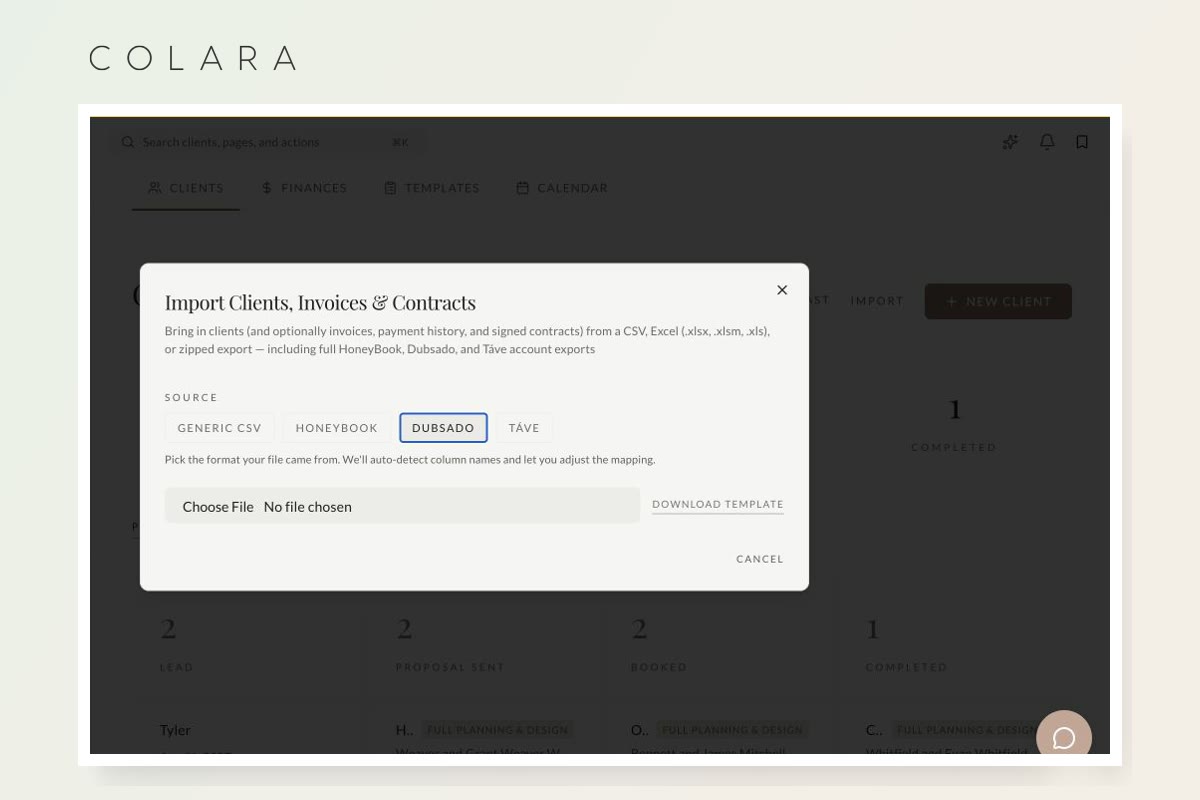
For a self-serve import, open Clients, choose Import, select Dubsado as the source, and upload the export. The importer suggests column mappings and shows a record preview before creating anything. Adjust any field or stage mapping that does not match your process.
If you prefer a hands-off migration, email the export to support@colara.co with the subject line "Dubsado Migration." The team will review the file, identify the supported fields, and prepare the mapping with you at no charge. Larger or unusually structured accounts can require additional review.
A low-risk migration sequence
- Export and preserve the original Dubsado files.
- Import a representative set and review the preview carefully.
- Confirm contact matches, pipeline stages, dates, balances, and document references.
- Rebuild the workflows and forms you actually use.
- Send new inquiries into the new CRM while active Dubsado projects finish on the schedule that creates the least client disruption.
- Keep the old account available until you have verified every record you are required to retain.
You do not need to move every active wedding on the same afternoon. Many businesses route new leads into the new CRM first, move future weddings next, and let near-term weddings finish where the client already knows the portal.
Dubsado or Colara: which model fits?
Dubsado is a strong fit for service businesses that want deep configurability across many industries and are comfortable building their own workflows. Colara is a fit for wedding businesses that want the CRM already connected to a wedding-specific operating system, including timelines, family-photo planning, vendor coordination, guest tools, layouts, and day-of execution.
The fair comparison is not that one platform has features and the other does not. It is whether you want a configurable blank canvas or a wedding-shaped system, and whether the permanent free planner CRM or free photographer CRM covers enough of your business before you pay for broader wedding-workspace features. See the detailed Colara vs Dubsado comparison for the current feature and pricing breakdown.
Dubsado product facts reviewed September 4, 2026 against its official pricing page, product and AI information, and Projects export documentation.
Frequently asked questions
Can I try Colara before canceling Dubsado?
Yes. The core CRM is free with no credit card required, so you can import records, test the pipeline, and keep your Dubsado account active while you verify the move.
Will Dubsado workflows transfer automatically?
No. Workflow logic, form layouts, canned emails, and scheduler configurations are platform-specific and need to be rebuilt. Use the migration as an opportunity to keep only the automations that still serve your current process.
Can Colara migrate my Dubsado export for me?
Yes. Free concierge migration is available. Send the export to support@colara.co and the team will confirm which fields can be mapped and prepare a preview before finalization.
Do I have to upgrade when the Pro trial ends?
No. Your CRM data stays in place and the core CRM remains available for $0 a month. Paid tools are optional; planners and photographers also keep one active timeline-enabled wedding workspace on the Free plan.
Your CRM can stay free
Move the records before you move the business
Preview your Dubsado import, confirm the mapping, and keep unlimited leads and clients for $0 a month.