Wedding Business
Wedding CRM Pipeline: 8 Stages From Inquiry to Review
A practical eight-stage CRM pipeline for wedding planners, photographers, venues, florists, and other wedding businesses—with the actions, fields, and follow-ups each stage needs.
Editorial Team · September 4, 2026

A wedding CRM pipeline should answer one question whenever you open it: what needs my attention next? If it only stores names and email addresses, it is a contact list. If it has twenty vague stages, it becomes another system you avoid updating. The useful middle is a short pipeline that follows the real buying and delivery journey—from the first inquiry through the review request.
This guide gives wedding planners, photographers, venues, florists, and other wedding professionals a practical eight-stage pipeline to copy. You can build it in a spreadsheet, in the CRM you already use, or inside a free CRM made for wedding businesses. The structure matters more than the tool.
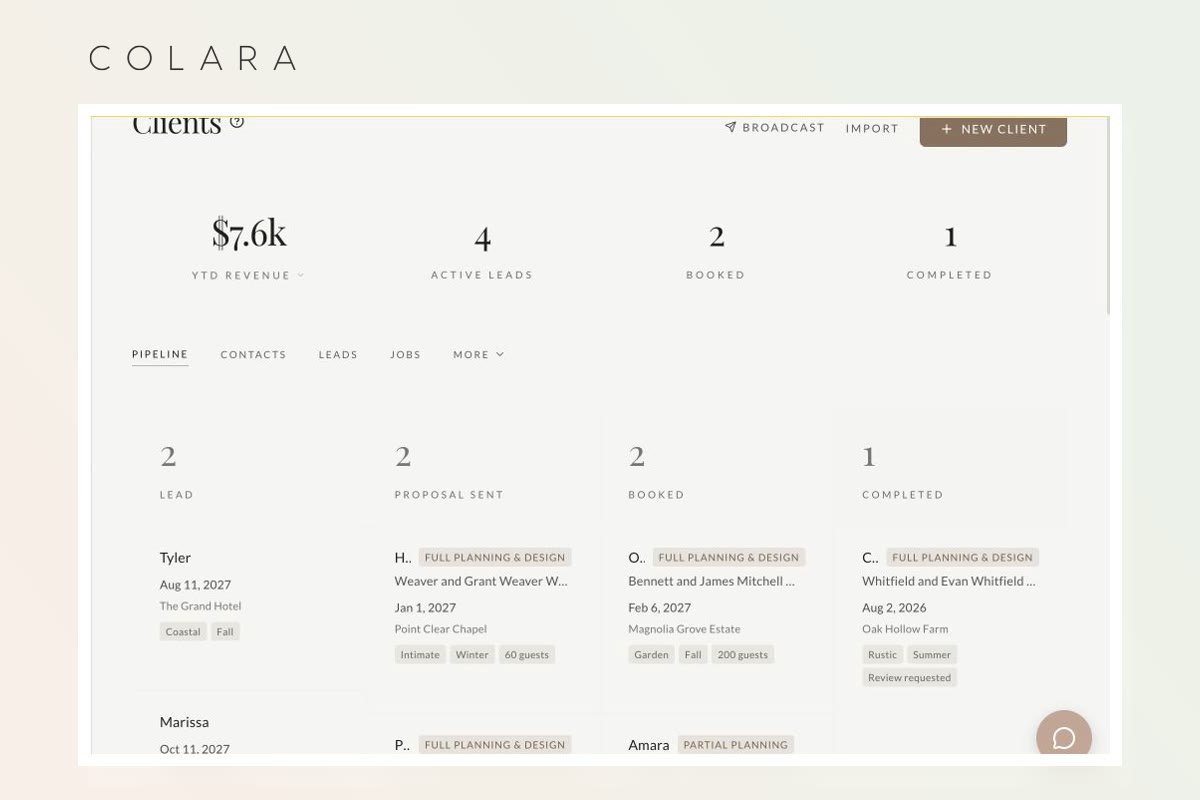
The eight wedding CRM stages
- New inquiry
- Qualified
- Consultation scheduled
- Proposal sent
- Decision pending
- Booked
- Planning and delivery
- Complete and follow-up
These stages separate a lead's status from the next action. “Proposal sent” describes where the relationship stands; “follow up Friday” tells you what to do. Keep both. A pipeline without next actions becomes a colorful archive.
1. New inquiry
Entry rule: a person has asked about availability, pricing, or services and has not been screened yet.
Capture every inquiry in one place, whether it arrived through your website, email, social media, a venue referral, or a phone call. At minimum, save the names, email, phone number, event date, venue or city, requested service, lead source, and the original message. Add an inquiry timestamp so you can see response time without guessing.
Next action: respond and check the basic fit. For a planner, that might be service level, budget, date, and location. A photographer may also need coverage hours and style fit. A venue needs guest count and event type. A florist needs floral scope, approximate budget, and delivery area.
Do not create separate stages for Instagram inquiries, website inquiries, and referrals. Those are lead sources, not pipeline stages. Keeping them as a field lets you compare which channels produce booked work later.
2. Qualified
Entry rule: the date, location, service, and broad budget fit your business, and both sides have enough information to keep talking.
Qualification is not about making people prove they deserve a consultation. It protects both sides from spending an hour on a call when the date is unavailable or the service is not a match. Record any decisive details and send the person the clearest useful next step: a scheduler, a pricing guide, a venue-tour link, or a short set of questions.
Next action: invite the lead to the appropriate consultation or visit. Set a follow-up date at the same time. If the person does not respond, your system should show that follow-up instead of depending on memory.
3. Consultation scheduled
Entry rule: a discovery call, venue tour, design consultation, or planning meeting is on the calendar.
Store the meeting date, time, timezone, format, and attendees. Send confirmation and reminder messages that make it easy to reschedule. Attach any pre-call questionnaire to the client record so the answers are available during the conversation.
Next action: prepare for and complete the consultation. Afterward, record the important decision criteria in plain language. “Wants documentary coverage and cares most about family photographs” is more useful than a page of unstructured notes.
4. Proposal sent
Entry rule: the lead has received the specific scope, price, and path to book.
The proposal should connect the agreed scope to the contract, invoice or retainer schedule, and expiration date. Save the exact version and sent date. If your proposal leaves the prospect hunting through several emails for the contract and payment link, the pipeline is organized but the client experience is not.
Next action: confirm receipt, then follow up on a stated date. A useful follow-up adds clarity—answering a question, restating availability, or offering help choosing between packages—instead of sending “just checking in” repeatedly.
5. Decision pending
Entry rule: the proposal is open and the prospect is deciding, asking questions, or waiting on another stakeholder.
This stage prevents active proposals from disappearing beneath brand-new leads. Record the decision date the prospect gave you, any unresolved question, and the last meaningful contact. If you hold dates, record when the hold expires and explain that policy clearly.
Next action: resolve the named blocker or follow up at the agreed time. After your defined follow-up sequence, close the opportunity as lost rather than leaving it active forever. Save a simple loss reason such as price, date unavailable, no response, chose another provider, or service mismatch. Those reasons are more valuable than a bloated pipeline.
6. Booked
Entry rule: define this precisely for your business—normally the contract is signed and the required retainer or first payment is complete.
“They said yes” is encouraging, but it is not a reliable operational trigger. The booked stage should launch onboarding: welcome message, client portal access, questionnaire, payment schedule, planning dates, and the internal handoff from sales to delivery. Keep the signed agreement and invoice status on the same record.
Next action: complete onboarding and confirm that the couple knows where documents, tasks, payments, and communication will live.
7. Planning and delivery
Entry rule: onboarding is complete and the wedding work is active.
A generic CRM often becomes less useful here because the event work moves into spreadsheets, documents, and a separate timeline tool. Wedding-specific software can keep the business record connected to the wedding itself. Depending on your role, that can include the timeline, questionnaires, vendor contacts, design decisions, floor plan, family-photo list, staffing, final payments, and day-of notes.
Next action: schedule the next milestone, not every conceivable task. Planners may track design approval and final vendor confirmations. Photographers may track engagement sessions, questionnaires, timeline review, and family-photo lists. Venues may track layouts, catering counts, insurance, access times, and final walkthroughs. Florists may track recipe approval, vessel inventory, final counts, delivery windows, and strike plans.
8. Complete and follow-up
Entry rule: contracted work is delivered and the account has no unresolved payment or service issue.
Completion is a revenue stage, not merely storage. Confirm the final balance, send the promised deliverables, request a review at an appropriate moment, ask for referral permission, and note future opportunities. A planner may ask for a testimonial after the couple has received the gallery. A photographer may separate gallery delivery from album completion. A florist or venue may schedule a brief vendor-partner follow-up.
Next action: close the loop, then archive the record with a review status and referral source attached. That makes next year's lead-source reporting far more trustworthy.
Fields every wedding lead record should have
- Primary and partner names
- Email address and phone number
- Wedding date and timezone
- Venue, city, or service area
- Requested service or package
- Estimated value
- Lead source
- Current pipeline stage
- Last contact date
- Next action and due date
- Proposal, contract, and invoice status
- Owner or team member responsible
- Closed-won or closed-lost reason
Avoid collecting information simply because a form allows it. Every required field adds friction. Start with what changes availability, qualification, pricing, ownership, or the next action.
How to keep the pipeline clean
Give every active record one owner
When two people are responsible, nobody is responsible. Team members can collaborate, but one person should own the next action.
Review it on a fixed rhythm
Spend ten minutes each workday on new inquiries and overdue actions. Once a week, review proposals, decision-pending leads, and records with no next step. Once a month, review lead sources, booking rate, lost reasons, and pipeline value.
Use automation for consistency, not concealment
Automate confirmations, reminders, questionnaires, and routine follow-ups where the message is predictable. Keep judgment-heavy communication personal. The goal is to remove dropped balls, not make a couple wonder whether a person is involved.
Do not confuse status with temperature
A “hot lead” label can be useful, but it does not replace a real stage. A highly interested lead who has not received a proposal is still in consultation or qualification, and the next action should make that visible.
Spreadsheet or CRM?
A spreadsheet can be enough when one person handles a small number of inquiries and is disciplined about follow-up. It is flexible, familiar, and nearly impossible to overconfigure. Its limits appear when messages, files, signatures, invoices, questionnaires, and reminders live elsewhere, or when a second team member needs to understand the record.
A CRM becomes useful when the pipeline can connect each stage to the work it creates. The strongest reason to switch is not that a board looks nicer than rows. It is that a new inquiry, proposal, contract, invoice, questionnaire, task, and client portal can stay attached to the same relationship.
You do not have to pay before testing that difference. Colara's core wedding CRM is $0 a month, with unlimited leads and clients and no deadline to upgrade. There are focused setup pages for wedding planners, wedding photographers, wedding venues, and wedding florists. You can also open the planner walkthrough or photographer walkthrough without signing up.
A 30-minute setup checklist
- Create the eight stages above.
- Define the exact entry rule for Booked.
- Add the essential record fields and one next-action field.
- Connect your inquiry form or decide who enters new messages.
- Create one consultation confirmation and one proposal follow-up template.
- Add your proposal, contract, invoice, and questionnaire templates.
- Move every active lead into the correct stage.
- Assign an owner and next action to every open record.
- Schedule a weekly pipeline review.
Do not spend the first day perfecting automations for edge cases. Run five real inquiries through the simple version. The missing fields and awkward stages will become obvious much faster than they would in a planning document.
Frequently asked questions
What is a wedding CRM pipeline?
It is the sequence of stages a wedding client moves through from inquiry to booking, delivery, and follow-up. Each stage should have a clear entry rule, responsible owner, and next action.
How many stages should a wedding CRM have?
For most wedding businesses, six to ten stages are enough. Use fewer if stages do not change the next action. Add a stage only when it creates a meaningfully different workflow, responsibility, or client experience.
What is the difference between qualified and consultation scheduled?
A qualified lead appears to fit your date, service area, offer, and broad budget. Consultation scheduled means a specific call, tour, or meeting is on the calendar. Keeping them separate shows which good-fit leads have not yet taken the next step.
When should a wedding lead move to booked?
Use one consistent rule, usually when both the contract is signed and the required retainer or first payment is complete. A verbal yes can remain in decision pending until the formal booking conditions are met.
Can a wedding business use a CRM for free?
Yes. Colara offers a permanent Free CRM plan for wedding businesses with unlimited leads and clients. It includes the pipeline, client records, proposals, e-sign contracts, invoices, scheduling, questionnaires, tasks, notes, and a branded client portal; paid wedding-workspace features are optional.
Build the pipeline, then use it
Start your wedding CRM for $0 a month
Keep unlimited leads and clients, with no card and no deadline to upgrade.